


If you’ve installed one or two aurora apps, you probably already know the feeling: it’s 18:30, your phone buzzes “Aurora Alert Level 3 – High Activity Expected”, and you’re standing in a city center wondering…
“Do I leave the restaurant now? Do I book a taxi to a dark spot? Or is this just another notification that leads to nothing?”
This article is here to remove that doubt. We’ll go through typical aurora alert levels and decode what they really mean for your night on the ground: how far you should move, when to get ready, what you can expect to see and when it’s okay to stay in your hotel bar.
What aurora alerts are (and what they are not)
Aurora alerts combine two big groups of data:
- Space weather (solar wind speed, density, IMF Bz, predicted KP index…)
- Local conditions (your GPS position, cloud cover, daylight, moonlight)
Most apps and websites translate these into a simple scale: from “Low” to “Extreme” or with numbers (for example, Level 1 to Level 5). That scale is a probability shortcut, not a promise.
Key idea: an alert level tells you how much effort it’s reasonable to invest right now to try to see the aurora. It’s a decision tool, not a guarantee of a sky on fire.
Typical alert scales and how to read them
Every tool names its levels differently, but in practice, they usually match one of these patterns:
- Very low / Level 0–1
- Low / Level 2 – “Heads-up”
- Moderate / Level 3 – “Good chance”
- High / Level 4 – “Go now”
- Very high / Level 5 – “Storm-level”
Let’s walk through each one and translate it into real-world decisions: do you grab your coat, your car keys, or your camera… or nothing at all?
Very low alert: “Don’t organize your evening around it”
This is the alert you’ll see during quiet solar conditions, or in the middle of a cloudy, stormy night. KP is usually around 0–1, sometimes 2, and conditions are not really improving.
What it means technically:
- KP forecast: 0–1 (maybe 2 for short periods)
- Solar wind: slow and stable
- Bz component: mostly pointing north (unfavorable)
- Cloud cover: often high in your region
What it means for you on the ground:
- If you’re in Tromsø, Abisko, Lofoten, Finnish Lapland or similar latitudes: you might still catch a weak, static arc near the northern horizon if the sky is clear. But it will probably be faint to the naked eye, more visible on camera with long exposure.
- If you’re in Reykjavik, Fairbanks, Yellowknife or similar: chances are low, but not zero. Only worth checking if you already have a clear, dark sky on your doorstep.
- If you’re in Scotland, southern Canada, northern US or central Europe: realistically, ignore it. The auroral oval is far north of you.
Recommended action: Don’t change plans. If skies are crystal clear and you’re in a prime aurora region, you can take a peek every hour from a dark corner near your accommodation. No need to drive 50 km into the countryside.
Low alert / “Heads-up”: “Keep an eye on it, but don’t rush”
Here, the system sees potential. Maybe Bz is flirting with negative values, solar wind is picking up a bit, or the KP forecast is creeping towards 2–3.
What it means technically:
- KP forecast: 2–3
- Solar wind: increasing but not very strong
- Bz: variable, occasionally southward (negative)
- Cloud cover: patchy, with possible openings
What it means for you on the ground:
- High-latitude locations (Tromsø, Abisko, Rovaniemi, Alta, Murmansk, northern Iceland): this is “normal aurora” territory. If the sky is clear and dark, you have a reasonable chance of seeing faint to moderate auroras, often as an arc or soft curtain. It may appear and fade within 10–20 minutes, then return later.
- Mid-latitude aurora towns (Reykjavik, Fairbanks, Yellowknife, Whitehorse): chances are decent, especially if KP heads towards 3 and Bz stays negative.
- Lower latitudes (Scotland, Baltic countries, northern Germany, Montana, North Dakota): still mostly too low, but if KP reaches 3 and stays there, a faint glow on the horizon is possible with a camera.
Recommended action:
- Finish your dinner, but pay attention to updated alerts around local time 20:00–23:00.
- If clouds are moving away, get your gear ready and know in advance where you’d drive if the alert jumps to “Moderate” or “High”.
- Stay flexible: this is a “be ready to move on short notice” situation, not a “run to the car now”.
Moderate alert / “Good chance”: “Worth going out if you can”
This is the level that often separates “maybe tonight” from “you should probably try”. KP is usually in the 3–4 range or expected to get there soon, and space weather parameters are finally cooperating.
What it means technically:
- KP forecast: 3–4, sometimes spiking higher
- Solar wind: fast enough (often > 500 km/s)
- Bz: frequently southward for 30+ minutes
- Cloud cover: mixed, but with exploitable clear sectors
What it means for you on the ground:
- High-latitude regions: this is the sweet spot. You can expect visible auroras to the naked eye if the sky is reasonably clear. They may be dynamic, with arcs turning into curtains, pulsating patches, and sometimes faint coronas overhead.
- Mid-latitude aurora towns: you’re now in good business. Aurora often visible overhead or to the south, not just as a faint northern glow.
- Lower latitudes (Scotland, northern England, Baltic regions, Canadian Prairies, northern US states): your chances are now real, especially if KP 4 holds for an hour or more. You may see a soft arc or discrete rays low on the northern horizon.
Recommended action:
- If you’re in a classic aurora destination and the alert is “Moderate” or equivalent, go to your dark-sky spot. This level justifies a 20–40 minute drive out of the city, especially if clouds are manageable.
- Aim to be in place between about 21:00 and 01:00 local time, with some margin on both sides.
- Allow at least 1.5–2 hours on site. Activity often comes in waves; people who leave after 15 minutes are usually the ones who miss the best burst.
High alert / “Go now”: “This is the night you planned your trip for”
When an app or website pushes a high-level alert, it usually means space weather indicators are clearly favorable: strong solar wind, sustained negative Bz, and KP heading for 5 or more.
What it means technically:
- KP forecast: 4–6 (or even higher)
- Solar wind: fast (>600 km/s) and dense
- Bz: solidly negative over extended periods (an hour or more)
- Cloud cover: doesn’t magically disappear, but even partial clearings are now worth chasing
What it means for you on the ground:
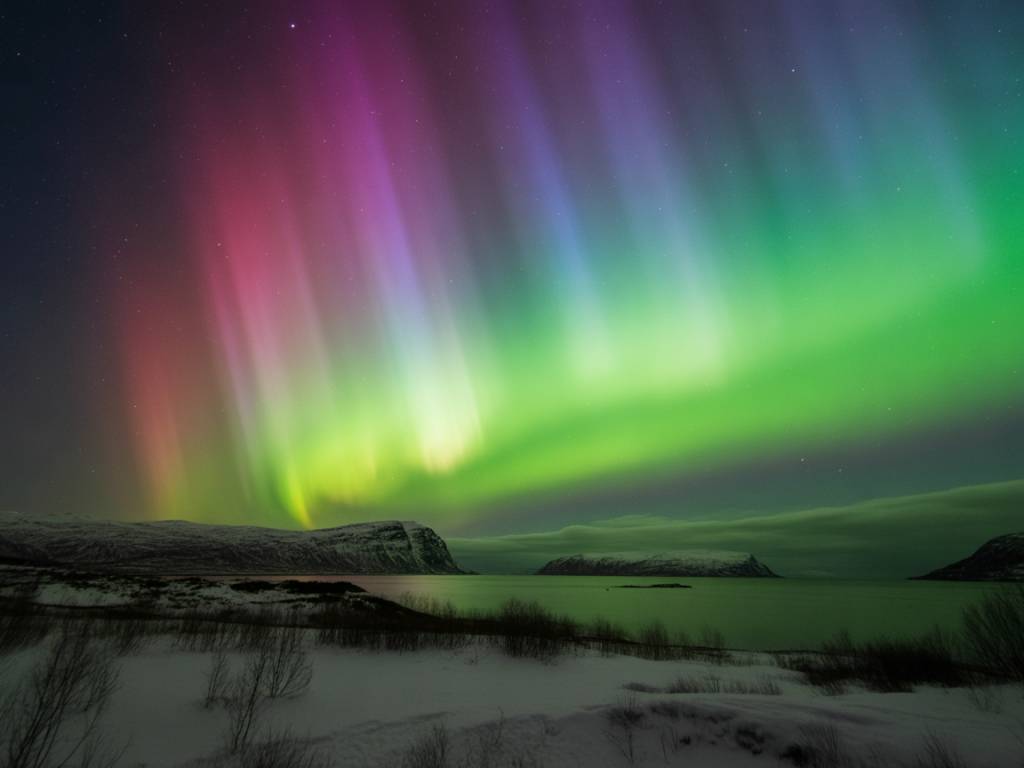
- High-latitude regions: you can get bright, dynamic auroras, often with red and purple edges, corona structures straight above your head, and frequent movements. This is when people start shouting in parking lots.
- Mid-latitude aurora towns: your sky can be spectacular, sometimes with auroras covering most of the sky, not just the north.
- Lower latitudes (northern Europe, much of Canada, northern US, parts of Japan, New Zealand’s South Island, Tasmania): this is when social media starts filling with pictures. Auroras can appear well above the horizon as distinct bands and rays.
Recommended action:
- If you get this alert and your sky is at least partially clear, go out. This is what you flew north for.
- Do not waste time in brightly lit places. Move to a dark spot with a clear view north (or simply a wide open sky if you’re under the auroral oval).
- Expect fluctuations: you may have 20–30 minutes of intense activity followed by calmer periods. Stay patient and watch for another surge.
A personal note: most of my “wow” nights in Norway, Finland and Iceland started with a jump from “Moderate” to “High” alerts within 30–60 minutes. The difference on the ground is huge; that’s usually the moment when quiet green arches suddenly ignite into fast-moving curtains.
Very high / storm-level alert: “Rare, chaotic, and worth losing sleep for”
These alerts are less common but unforgettable. They usually correspond to geomagnetic storms driven by coronal mass ejections (CME) hitting Earth.
What it means technically:
- KP forecast: 7–9 (G3–G5 storm levels)
- Solar wind: very fast and turbulent
- Bz: often strongly negative for long periods
- Magnetometers: going wild
What it means for you on the ground:
- High-latitude regions: the sky can be completely filled with auroras, from horizon to horizon, pulsing, twisting, changing shape every few seconds. Even people in brightly lit city centers will see them overhead.
- Mid-latitudes: this is when auroras show up far to the south of their usual positions, sometimes directly overhead in places where people almost never see them.
- Low latitudes (central Europe, much of continental US, southern Australia, northern Spain, Italy, Greece, etc.): you may see auroras as strong colored glows and clear beams on the northern (or southern) horizon. Cameras will capture deep reds and greens.
Recommended action:
- If you get a storm-level alert and you have any chance of seeing a piece of dark sky, go look, even if you’re much farther south than “normal” aurora regions.
- Stay flexible with timing. Strong storms can produce several major peaks over many hours, including after midnight and near dawn.
- Expect crowds in easily accessible viewpoints around popular aurora towns; have a backup location in mind.
How timing interacts with alert levels
Alert level is only one piece of the puzzle. You’ll get the most out of it if you combine it with the three big timing factors:
- Darkness: you need astronomical night or at least civil/nautical night with limited twilight, especially at lower latitudes. In the Arctic autumn and spring, that usually means between about 20:00 and 02:00.
- Local magnetic midnight: auroral activity often peaks around this period, which is usually between 22:00 and 01:00 local time in the main aurora zones.
- Short bursts: even on a strong night, the best displays can last just 10–20 minutes. That’s why a “Moderate” or “High” alert is a signal to already be in place, not to start driving.
In practice: if your app raises the level from “Low” to “Moderate” around 19:30, and you need 30 minutes to reach a dark spot, go now. Arriving early and waiting is cheaper than watching the best burst happen through your windscreen.
Cloud cover: the silent killer of good alerts
You can have a “High” alert and see absolutely nothing if the sky is 100% overcast. That’s why on Northernlights-Forecast, I always insist on checking cloud maps along with your aurora alerts.
Here’s how to weigh alerts against clouds:
- Moderate alert + patchy clouds: drive towards clearer sectors if they’re within 30–40 minutes. Thin or broken clouds are often okay; strong auroras shine through them.
- High alert + heavy clouds: look at satellite imagery and cloud forecasts. If there’s no gap within driving distance, save your energy. If there’s a potential opening 60–90 minutes away and you’re on a once-in-a-lifetime trip, this might be the moment to go.
- Low alert + heavy clouds: don’t bother. You’re fighting space weather and weather at the same time.
Turning alerts into a simple decision plan
If you’re not used to reading KP charts or solar wind graphs, use your alert level this way:
- Very low: Stay relaxed. Enjoy your evening plans. Check the sky only if it’s crystal clear and you’re already in a prime aurora zone.
- Low / Heads-up: Prepare. Charge your batteries, check your route to a dark spot, follow updates around 20:00–23:00.
- Moderate / Good chance: Go out if reasonably clear. Justifies a short drive. Stay at least 1.5–2 hours in place.
- High / Go now: Drop non-essential plans. Get under a dark sky. This level is rare enough to deserve your full attention.
- Very high / Storm-level: If you’ve ever wanted to see the sky explode, this is your invitation. Even from cities and lower latitudes, it’s worth stepping outside.
Managing expectations (and stress) around alerts
A last point that matters more than most people think: aurora alerts are probability tools, not performance scores for your trip. Some nights will underperform, some will surprise you at a “Low” level. That’s part of the game.
You’ll enjoy your trip more if you:
- Use alerts to optimize your time, not to judge the night as “good” or “bad”.
- Accept that even a “High” alert can produce quiet periods; the sky has its own rhythm.
- Remember that in good aurora regions, several “Moderate” nights can be more rewarding overall than one chaotic storm night hidden behind clouds.
With a basic understanding of what each alert level really means, you don’t need to obsess over KP charts anymore. You just translate: “What does this notification mean for me, here and now? Is it worth moving, or is it a night to rest?”
Answer that clearly, night after night, and you’ll remove most of the “weather stress” from your aurora hunt—while giving yourself the best possible chance of being in the right place when the sky finally erupts.